
Author's Comment Box WordPress Plugin
by dragonapps in Plugins
Highlight author comments across your WordPress site and make important replies easy to spot.


Custom Code Manager gives Convoro admins an easy way to add custom Meta/Head markup, CSS, Header JavaScript, and Footer JavaScript
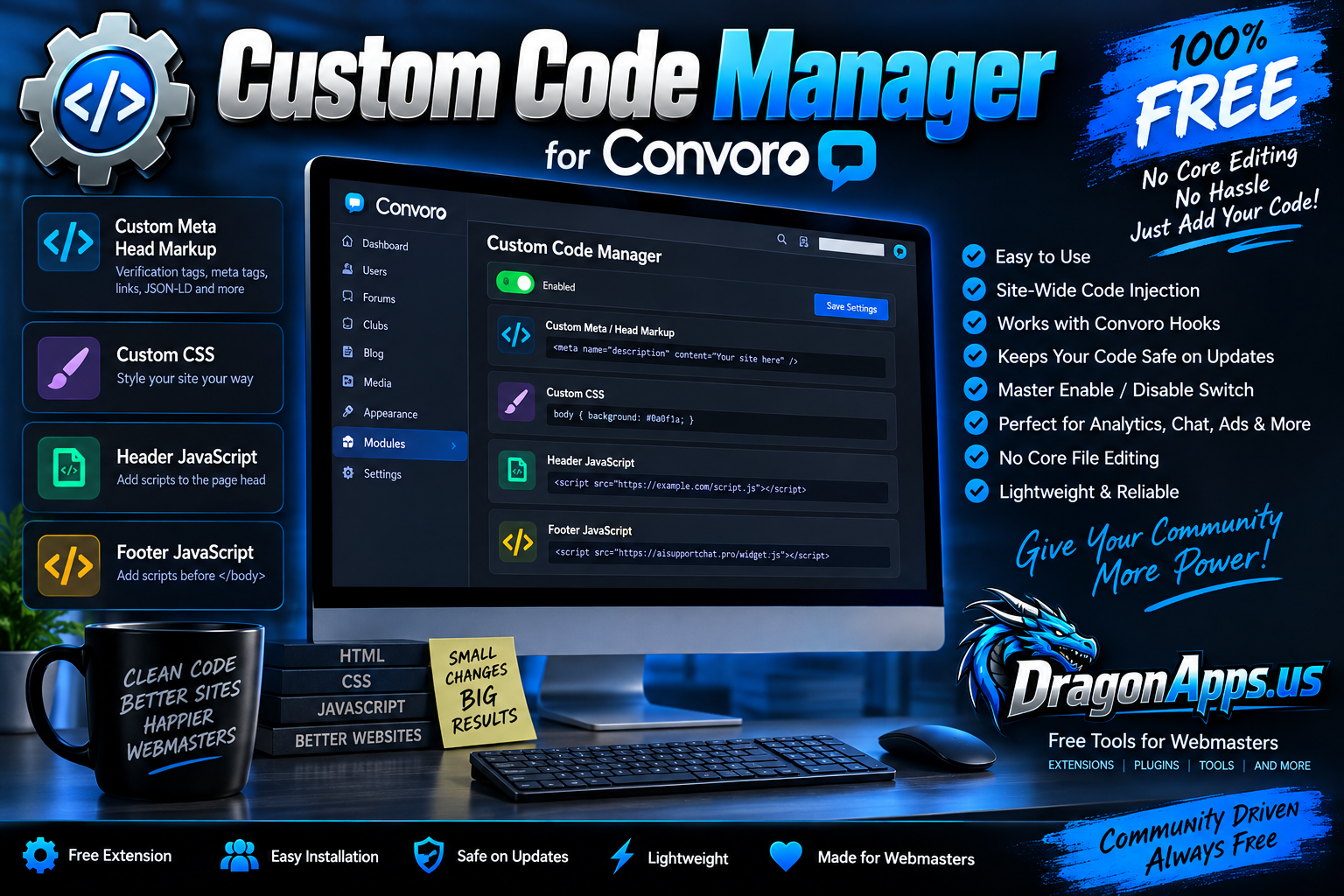
It is especially useful for analytics, verification tags, support widgets, chat systems, custom styling, third-party integrations, tracking scripts, and other site-wide additions that would normally require editing files manually.
And because apparently every website eventually needs “just one little script added somewhere,” this gives it a proper home instead of turning your theme files into an archaeological dig.
Add site-wide head markup such as:
• Meta tags
• Search engine verification tags
• Social verification tags
• Link elements
• JSON-LD structured data
• Other custom head markup
Your code is injected through Convoro's native page rendering system.
Custom CSS
Add your own site-wide CSS directly from the Convoro Admin Panel.
You may enter:
• Plain CSS
• Complete style blocks
Plain CSS is automatically wrapped in the proper style tags.
Great for:
• Theme adjustments
• Font changes
• Colors
• Layout modifications
• Button styling
• Custom responsive rules
• Hiding or modifying specific interface elements
Header JavaScript
Add custom JavaScript intended for the page header.
Supports:
• Raw JavaScript
• Complete script blocks
• External JavaScript files using script src tags
Useful for integrations that specifically request header placement.
Footer JavaScript
Add JavaScript near the end of the page body using Convoro's native body.end hook.
This is ideal for:
• Live chat widgets
• Customer support widgets
• Analytics
• Tracking scripts
• Third-party embeds
• Popup systems
• Marketing tools
• External JavaScript libraries
Full external script tags can be pasted directly into the field.
For example, a third-party support widget can be added without touching a single Convoro template file.
SAFE UPGRADE STORAGE
Beginning with v1.0.1, Custom Code Manager stores its configuration outside the replaceable extension directory.
That means your saved:
• Meta code
• CSS
• Header JavaScript
• Footer JavaScript
• Enable/Disable setting
remain intact when the extension is reinstalled or upgraded.
Your custom code belongs to your website, not inside a folder that gets demolished every time an update arrives. Revolutionary concept, apparently.
MASTER ENABLE / DISABLE SWITCH
All custom output can be disabled from one setting without deleting the code you have saved.
This is useful when:
• Troubleshooting a conflict
• Testing a new script
• Temporarily disabling an integration
• Checking whether custom CSS is causing a display problem
Disable the extension output, test the site, then enable it again when ready.
BUILT FOR CONVORO
Custom Code Manager uses Convoro's native template hook system rather than editing core files.
It uses:
• head.after for head content
• body.end for footer scripts
This keeps the extension separate from Convoro core files and makes future Convoro updates much safer.
NO CORE FILE EDITING
You do not need to manually edit:
• Theme templates
• Header files
• Footer files
• Convoro core files
Everything is managed from the Convoro Admin Panel.
BROWSER-BASED CONFIGURATION
No SSH access is required for normal use.
Once installed, all custom code can be managed from your browser through the extension's admin screen.
GOOD USES FOR CUSTOM CODE MANAGER
Custom Code Manager can be used for things such as:
• Google verification tags
• Bing verification tags
• Analytics platforms
• Live chat widgets
• AI customer support widgets
• Helpdesk integrations
• Advertising scripts
• Affiliate tracking
• Custom fonts
• Custom CSS
• Social media tracking pixels
• Structured data
• External widgets
• Site ownership verification
• Custom JavaScript tools
INSTALLATION
Install the extension using Convoro's normal extension installation process.
After installation:
No database setup or manual configuration is required.
REQUIREMENTS
• Convoro compatible installation
• Administrator access
• JavaScript enabled in the browser for JavaScript-based integrations
Third-party services may have their own account or API requirements.
VERSION
Current Version: 1.0.1
v1.0.1 includes persistent settings storage so custom code remains saved during future extension reinstalls and upgrades.
PRICE
100% FREE
There are:
• No premium features
• No paid upgrades required
• No subscription
• No locked functionality
LICENSE
MIT License
You may use and modify the extension in accordance with the included license.
Custom Code Manager for Convoro gives administrators one clean place to manage the little bits of CSS, JavaScript, metadata, widgets, verification tags, and third-party embeds that somehow accumulate on every website ever built.
No core editing. No theme hacking. No hunting through templates six months later wondering who put that script there.
This one is FREE. Claim it and the code, the licence key and every future update are yours, with no payment step and nothing to renew. Author support is included for the first 6 months; extending it to 12 months is a paid option, and after that it continues in 6-month terms you can cancel whenever you like.
Sign in to leave a review. Reviews are moderated before they appear.
Reviews are written by signed-in members and read by a moderator before they appear. A purchase badge appears once orders are recorded.
Support for this listing comes from its author, not from the marketplace. It covers installs, configuration and bugs in the code as described on this page. Sending a request needs an account, so the author knows who they are talking to.
Sign in to contact the author about a purchase.
No releases recorded yet. The full changelog is in the download.
Full changelog back to Nov 2026 is in the download.

Kept in this browser for the session — not tied to your account.
by dragonapps in Plugins
Highlight author comments across your WordPress site and make important replies easy to spot.
by dragonapps in Plugins
Deactivate and delete WordPress plugins directly from the Plugins screen without navigating through multiple confirmation pages.

Comments (0)
Questions before you buy, answered on the page. Comments are public and visible to everyone.
No comments yet. Ask the author anything about the code before you buy.
Sign in to join the comments.